

One of the primary challenges in Notion education and learning how to use Notion is how frequently common use patterns fluctuate, meaning that the methods you’ve developed for using the software suddenly stop working as expected.
Over the years, we’ve noticed that Notion’s designers themselves sometimes have a narrow view of the app’s design history. We weirdos like Notion Mastery founder Marie Poulin and me who’ve been using and teaching Notion for eight years have an extended historical understanding of design precedent that cannot be “seen” by observing the app in its current state. And I think this is true of all software/power-user combos.
The code of an app, as a snapshot, can “lie” to you about what is actually “known” about how/why it works. The emergent patterns of use are often masked by a solitary viewpoint.
Said differently: how your app is designed is different from how it is used. And if you don’t notice this gap in emergent user behaviors, you can break the important patterns that sort of calcify around your design intentions. The patterns that users discover while operating in a complex environment are implicitly part of your design, even if you had no intention to design them in the first place.
Why am I telling you this? Well, recently the /cr command that used to be one of the fastest shortcuts to the Linked view of data source block started showing Dashboard view instead.
Hang on…“cr“? How the heck is “cr” representative of “Linked view of data source”?
Well, in early Notion days, this block was labeled “Create linked view of database,” so typing /cr matched the beginning of “Create”, but then Notion added an AI block that also matched “cr,” and so we all switched to using the other shortest shortcut /of since it matched the “of” in the original block name.
You might think, hey, that’s not really the name of a block at all, but a descriptive action you might employ to create a block. And you’d be right, which is why Notion re-labeled it a few years back. Eventually it was renamed “Linked view of database,” and finally, “Linked view of data source” when Notion introduced multi-source databases (unrelated aside: one of my least favorite design decisions in the product’s history).
And yet the /cr shortcut remained! I’ve always preferred /of since it’s still in the name of the block and it gets you right to it faster than typing out /linke.
At least it did remain, until last week, when my friend Stephen @ Notion changed the description “Create a dashboard database view” to “Create a dashboard view”. And then, all of a sudden, /cr preferred “Dashboard view” in the menu.
What a seemingly innocuous change! My word, software is complicated.
And then we were left with only /of.
So we complained, of course. If you type the same command hundreds of times a day as power-users do, these things get noticed. Muscle memory is key with complicated keyboard-driven interfaces. For power users, messing with implicit UX flows is often as serious as a major bug at scale.
Not to mention the fact that now we had to go back and update hundreds and hundreds of educational resources where we tell users, “Use /cr to insert a linked view of <database>”. Oof.
And “Notion” (Stephen, as always) listened:
And so today we have him to thank for some new commands:
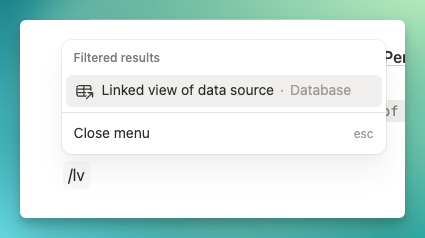
/lv=> Linked view of data source/bt=> Button/da=> Database – Inline
/lv is fantastic as it’s very unlikely to get trodden on by another word by the fuzzy-search in the slash command menu. And it now points to the most powerful block in Notion’s library of primitives: The illustrious Linked View.
Design languages are living records. If you discount history in your designs, you’re often doomed to design away the things that delight your users. A functional test can “guarantee” that the emergent patterns in UX are protected, but nerds like myself and my fellow Notion Ambassadors are often the holders of arcane organizational insight that even employees of software companies don’t have.
The nerds’ll tell you when an important user-defined emergent pattern has been stepped on. Sometimes it might sound weird. But often users use your product way more than you do as the designer of the product, or have coined workarounds for product limitations. I think it’s sometimes important to consider whether design is aware of these patterns so they can be protected when product complexity is extreme.
It might sound nutty, but /lv is my favorite change Notion has made this year. It’s representative of fixing the million little paper cuts of design teams operating at scale, making the movements we rely on to work daily smoother, as well as protecting the insertion of the most important block in Notion.
Today I feel a little bit more heard as a power user—and Notion’s a little more intuitive to boot.
 Notion tips in your inbox